

Contract
Under Settings > Contract, you configure number ranges, BCC addresses, digital signatures, and contract stationery. ↗ Open in Locaboo
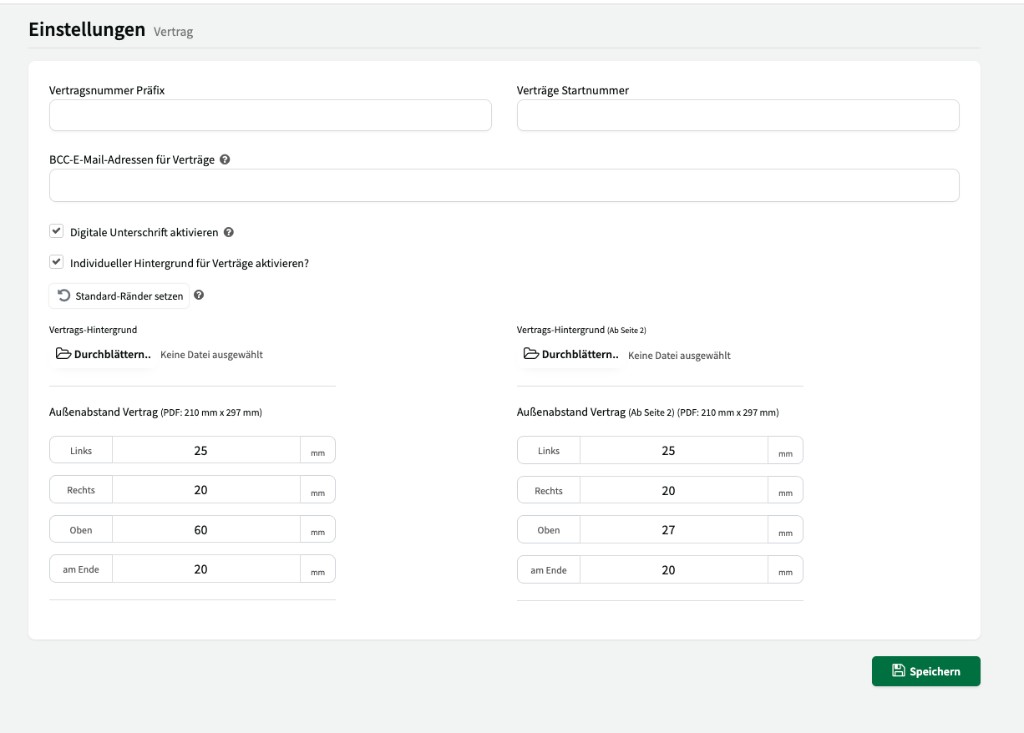
Number range
Section titled “Number range”| Setting | Description |
|---|---|
| Contract number prefix | Prefix prepended to every contract number (e.g. CT-). |
| Contracts starting number | Starting value for sequential contract numbering. |
BCC email addresses for contracts
Section titled “BCC email addresses for contracts”Email addresses that receive a blind copy on every contract send (e.g. your legal department or accounting).
Digital signature
Section titled “Digital signature”Enable the Activate digital signature checkbox to let customers sign contracts digitally.
Custom background
Section titled “Custom background”Enable Activate custom background for contracts? to use your own contract paper (e.g. with your letterhead).
Use the Set default margins button to reset outer spacing to the default values.
You can upload two separate backgrounds:
| Area | Description |
|---|---|
| Contract background | Background for the first page of the contract (e.g. full letterhead). |
| Contract background (from page 2) | Background for all following pages (e.g. simplified header). |
Contract outer margin
Section titled “Contract outer margin”For the first page and following pages, you can configure page margins separately (values in mm, PDF format 210 mm × 297 mm):
| Margin | Page 1 (default) | From page 2 (default) |
|---|---|---|
| Left | 25 mm | 25 mm |
| Right | 20 mm | 20 mm |
| Top | 60 mm | 27 mm |
| Bottom | 20 mm | 20 mm |